
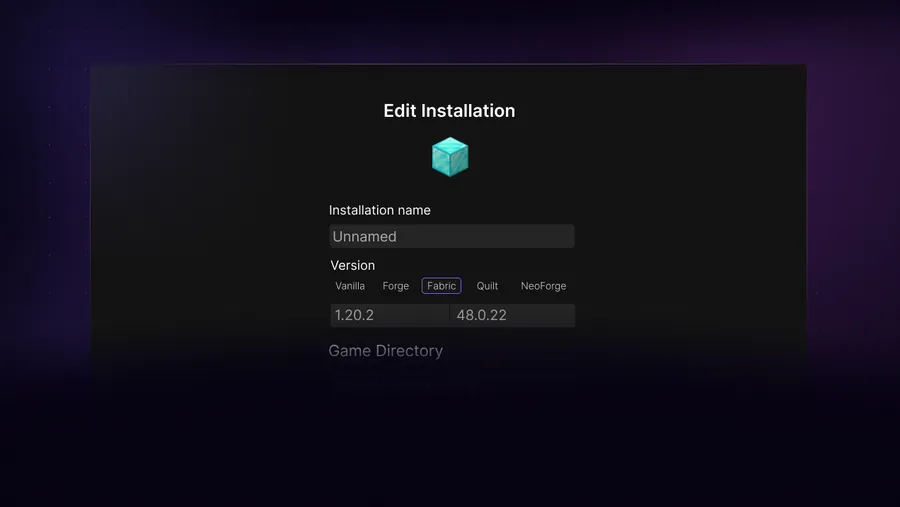
Match the mod, Minecraft version and loader
Three labels must agree before a mod can load: the Minecraft version, the modloader and the mod release. A Fabric mod for Minecraft 1.21.1 does not become a Forge mod when moved to another folder. Likewise, a Forge build for one game version may fail on the next patch even when the mod name is identical.
Read the mod's dependency list. Fabric mods often require Fabric API; other projects require Architectury, Cloth Config, Kotlin or a library from the same author. Downloading the visible feature mod without its dependencies can produce an immediate startup crash.
- Lock one Minecraft version before searching for files.
- Choose Fabric, Forge or NeoForge and do not mix loader builds.
- Download every required dependency for the same version pair.
- Prefer the mod author's page, Modrinth or CurseForge over repost sites.
| Example label | What it means |
|---|---|
| 1.21.1 Fabric | Only for Minecraft 1.21.1 with Fabric |
| 1.20.1 Forge | Only for Minecraft 1.20.1 with Forge |
| NeoForge | Not interchangeable with every Forge build |
| Requires Fabric API | Install the matching Fabric API dependency |
Do not download executable mod installers
Most ordinary Java Edition mods are JAR files placed in the profile. An unrelated EXE, APK or browser extension is not a normal Minecraft mod.
Create a modded SKlauncher installation
Open the SKlauncher installation manager and create a new profile instead of modifying the only working vanilla installation. Select the target Minecraft version and then the loader. Give the profile a name that includes both, such as 1.21.1 Fabric Mods, and assign a dedicated directory.
Launch the loader profile once before adding mods. Reaching the Minecraft main menu confirms that SKlauncher, Java, the game version and loader can start together. If it fails now, adding mod files will only hide the original cause.
Create a new installation
Choose the exact game version and loader.
Use a dedicated directory
Do not share the mods and config folders with another loader.
Launch once without mods
Confirm the loader reaches the main menu.
Close Minecraft
Add files only while the game is stopped.
Put mods in the correct SKlauncher folder
Open the dedicated game directory for the profile and locate its mods folder. If the loader profile has been launched successfully and no folder exists, create a folder named exactly mods. Copy the downloaded mod JARs and their dependencies into it without extracting them.
The default global .minecraft/mods path is correct only when the profile actually uses the global game directory. A dedicated SKlauncher installation can point somewhere else. Always follow the profile directory shown in the launcher rather than assuming every installation shares one folder.
Open the profile directory
Use the path configured for the specific SKlauncher installation.
Find or create mods
The folder name is lowercase
mods.Copy JAR files
Do not unzip normal mod JAR files.
Launch and inspect the mod list
Confirm each expected mod is recognized before opening an important world.
Back up worlds first
Mods can change blocks, entities and world data. Removing a content mod later can permanently remove its blocks or items from a save.
Fix mods that crash or do not appear
Start by reading the loader or crash log for the first missing dependency, wrong loader or incompatible version message. Remove the last batch of mods and test again. Binary search is faster than guessing: disable half of the added files, test, and continue with the failing half until the conflict is isolated.
Performance mods deserve the same compatibility check as content mods. Sodium normally targets Fabric and may require Iris for shaders. OptiFine can conflict with Forge mods that replace the same rendering systems. Do not install several renderers together unless the projects explicitly document compatibility.
| Symptom | Likely cause | Action |
|---|---|---|
| Mod not listed | Wrong folder or loader | Check profile path and file label |
| Missing dependency | Required library absent | Install matching dependency |
| Crash after update | Version mismatch | Restore last working set |
| World will not open | Removed content mod | Restore backup and original mod |
SKlauncher mods compatibility checklist
A stable SKlauncher mods profile has one Minecraft version, one loader ecosystem and a documented set of dependencies. Write those details in the profile name before copying any JAR files. For example, a profile named 1.21.1 Fabric Mods is easier to audit than a generic profile called New Installation. Launch the empty loader profile once so failures cannot be blamed on SKlauncher mods that are not installed yet.
Add SKlauncher mods in small groups and keep the last working file list. When a crash appears, compare each mod's Minecraft version, loader label and required libraries before increasing memory or reinstalling the launcher. Update SKlauncher mods only after reading their changelogs, and test a copied world when a mod changes blocks, entities, dimensions or world generation. Removing a content mod can damage data even when Minecraft reaches the main menu.
- The SKlauncher mods compatibility checklist verifies author or platform sources.
- The SKlauncher mods compatibility checklist separates Fabric, Forge and NeoForge profiles.
- The SKlauncher mods compatibility checklist keeps normal mod JAR files intact.
- Back up worlds before adding, removing or updating content mods.
SKlauncher mods FAQ
Can you download mods with SKlauncher?
Yes. Stable SKlauncher supports modded installations. You still need to choose a compatible loader and obtain each mod from a trustworthy source.
Where is the mods folder in SKlauncher?
It is inside the game directory configured for that installation. Dedicated profiles may not use the global .minecraft folder.
Can I use Fabric and Forge mods together?
Not normally. Choose one loader ecosystem for the profile unless a documented compatibility layer supports the exact mods and versions.
Can I install mods offline?
Previously downloaded mod JARs may be copied offline, but the launcher and game may still need cached libraries, assets and authentication. Download dependencies before disconnecting.
Can I install the Chipped mod or Sodium?
Yes when you download the build for the exact Minecraft version and loader and include its documented dependencies. Sodium is generally a Fabric performance mod.
Sources and verification
This guide uses current first-party information checked on July 13, 2026.
SKlauncher update 3.2 Modrinth mod platform CurseForge Minecraft mods